
Trip.com Promo Codes
The Irish Times may earn a commission from some links in this article. Our recommendations are based on independent research and editorial review. Pricing and availability are accurate as of publication date and subject to change.
Active Offers
14% Off Dan Inn Planalto São Paulo
Save 14% on your stay at Dan Inn Planalto São Paulo when you book with Trip.com.
10% Off Attractions & Tours
Enjoy 10% off your next adventure when you book attractions and tours with Trip.com.
10% Off Hotels & Homes
Save 10% on your next stay at hotels and homes with Trip.com and enjoy great accommodations at a better price!
10% Off Airport Transfers
Save 10% on your next airport transfer with Trip.com and enjoy a hassle-free start to your travels!
3% Off Flights at Trip.com
Save 3% on your next flight with Trip.com and make your travel plans even more affordable!
11% Off Hotel Nacional Inn Jaragua Sao Paulo
Save 11% on stays at Hotel Nacional Inn Jaragua Sao Paulo when you book with Trip.com for great value.
11% Off Hotel Panamby São Paulo
Save 11% on your stay at Hotel Panamby São Paulo through Trip.com.
Trip.com was founded in 1999 and is one of the leading international online travel agencies, allowing users to book a wide range of travel products, including flights, hotels, trains, car rentals, airport transfers, tours, attraction tickets, and more.
Serving over 200 countries and regions and offering services in multiple languages, with pricing available in many local currencies, Trip.com helps users plan and book everything from short city breaks to long-haul international trips.
A guide on how to use your Trip.com discount code
Use the “Get Code” button to claim your Trip.com promo code from Irish Times Discount Codes to use on your booking.
Go to Trip.com’s website and enter your destination details, travel dates, and passenger information. This will display available flights from various airlines at different price points.
Select the flights you prefer and proceed to checkout. Enter your Trip.com discount code in the promo code box and apply it to your booking before completing payment.
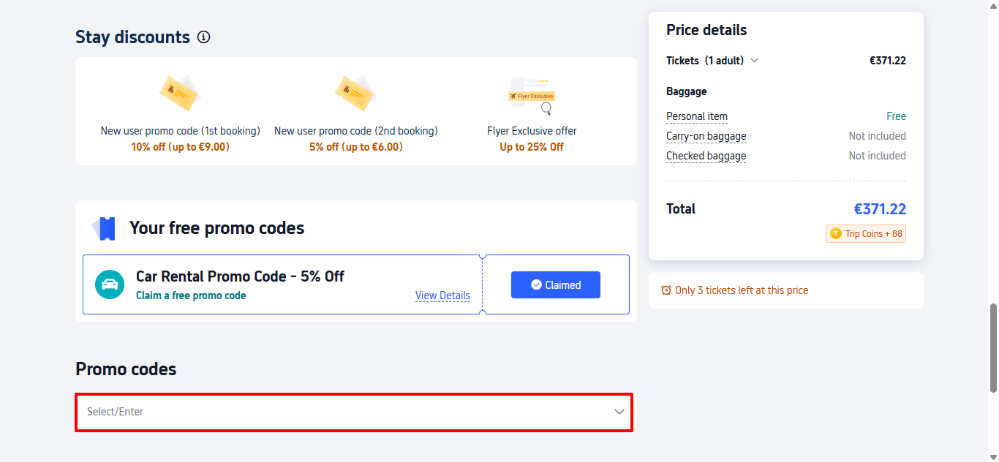
Save smart by using these easy tips and tricks
Maximise your savings on Trip.com travel bookings by following the tips below.
- Sign up for the Trip.com newsletter – Subscribe to Trip.com’s mailing list to receive exclusive promotional offers, as well as notifications about flash sales, promo codes, and seasonal travel deals.
- Use the app – Download the Trip.com app to unlock app-exclusive discounts on flights, hotels, and more that may not always be available on the desktop website.
- Trip Coins – Join Trip.com’s rewards programme for free to earn “Trip Coins” on eligible bookings. These coins can be used like cash at checkout to reduce the cost of future bookings.
Frequently asked questions about Trip.com
Is Trip.com IATA certified?
Yes, Trip.com is IATA-approved which means they they meet strict standards for compliance with airline rules and secure booking processes.
Is it safe and reliable to book flights or hotels through Trip.com?
Yes, Trip.com is a secure platform that allows users to book flights, accommodation, and other travel services.
Can I cancel a booking and get a refund through Trip.com?
Most bookings can be cancelled, but refund eligibility depends on the specific airline, hotel, train operator, or service provider’s individual policy.
How do I contact Trip.com?
You can contact Trip.com through their live chat service on the website or by calling (0818) 882 064.
What happens if something goes wrong with my booking?
If an issue arises, such as a flight delay or a hotel problem, Trip.com’s customer support team will aim to assist you and help resolve the matter as efficiently as possible.
The Irish Times may earn a commission from some links in this article. Our recommendations are based on independent research and editorial review. Pricing and availability are accurate as of publication date and subject to change.