
Govee Promo Codes
The Irish Times may earn a commission from some links in this article. Our recommendations are based on independent research and editorial review. Pricing and availability are accurate as of publication date and subject to change.
Active Offers
€30 Off GoveeLife Smart Air Purifier 2
Save €30 on Govee smart air purifier with advanced filtration for cleaner, healthier indoor air.
€21 Off Govee RGBIC LED Neon Rope Lights for Desks [Energy Class G]
Brighten up your desk space with Govee's Neon Rope Lights and enjoy €21 off, adding a splash of color to your workspace.
Up to 50% Off Sale Products
Save up to 50% on sale products at Govee, making it easy to score value on discounted items today.
10% Off With Purchase Of 2 Selected Products
Your order qualifies for 10% off when you purchase 2 selected products from Govee.
Holiday Lights From €69.99
Brighten up your space with Govee smart holiday lights starting at €69.99.
Govee was founded in 2017 with the plan to create a combination of smart technology with visually immersive lighting experiences that are easy for everyday users to set up and control. Gaining recognition for its colourful RGBIC lighting, Govee grew into a global smart home brand.
Best known for its innovative LED lighting and connected home products, customers can find smart LED light strips, light bars, bulbs, floor lamps, TV backlights, ambient lighting systems, thermometers, hygrometers, and appliances when they shop at Govee. Get the chance to customise the colours in your house as well as its scenes, schedules, and music synchronisation directly from your smartphone.
A guide on how to use your Govee discount code
Find a Govee promo code to use on your order right here at Irish Times Discount Codes. Click on “Get Code” to reveal the code you will use.
Proceed to Govee’s website where you can start adding smart lights and appliances to your shopping cart.
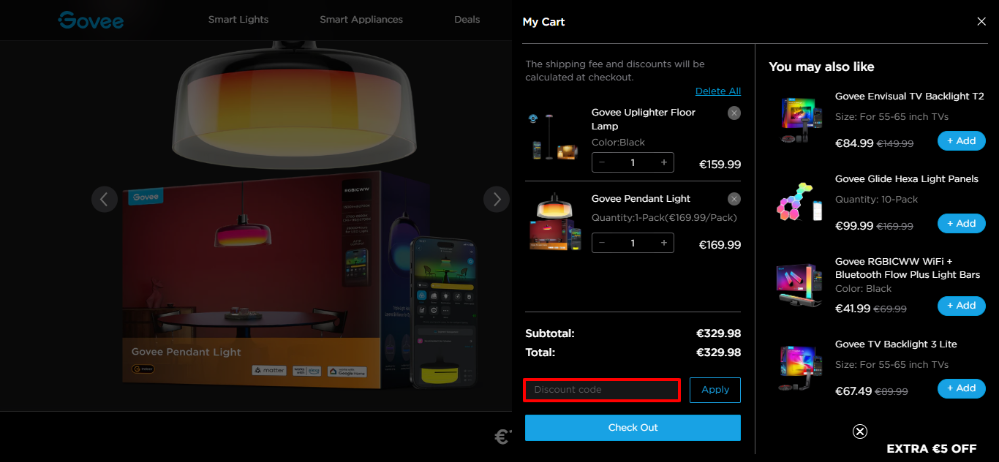
Every time you add something to your cart, it will open a side tab where you can see what is in your cart. At the bottom of the items, you will find the place where you can paste your Govee discount code from Irish Times Discount Codes.
Save smart by using these easy tips and tricks
Get more for your money on your next Govee order by using the savings options below.
- Student discount – Unlock your Govee student discount every time you shop for lights and appliances by verifying yourself as a student.
- Subscribe to Govee’s emails – Signing up to Govee’s mailing list gives you €5 off your first order over €30, as well as access to exclusive discounts, early sale alerts, and updates on new product launches.
- App-exclusive deals – The Govee Home app occasionally includes special promotions, bundles, or app-only discounts that aren’t always available on the website.
- Key worker discount – Get a discount on your order every time you shop at Govee when you verify your military, healthcare, teacher, or first responder status.
- Refer a friend – When you refer someone to shop at Govee, they will receive €5 and you will receive 8% commission from the sale.
Frequently asked questions about Govee
Why won’t my Govee lights connect to the app?
Make sure you’re connecting your lights to a 2.4 GHz Wi-Fi network and that your Bluetooth is enabled on your phone.
What do I do if my lights show “offline” in the app?
If a light appears offline but has power:
- Restart the lights by unplugging and plugging them back in.
- Restart your router.
- Check your Wi-Fi signal strength near the lights.
Why do my Govee lights disconnect from Wi-Fi randomly?
This could be caused by:
- The router switching between 2.4 GHz and 5 GHz.
- Connections dropping if the Wi-Fi signal is weak or there’s interference in your home.
How do I integrate Govee lights with other smart home systems?
You need to make sure that you have:
- Connected your lights correctly in the Govee Home app first.
- Linked your Govee account with the other smart home systems.
- Put your lights in the correct room in the voice assistant app so commands are applied correctly.
What should I do if the colours or effects aren’t working right?
You should check the physical connections on LED strips as loose plugs can cause colours to shift. The lights and app should be running the latest firmware updates.
The Irish Times may earn a commission from some links in this article. Our recommendations are based on independent research and editorial review. Pricing and availability are accurate as of publication date and subject to change.